Uspacy Knowledge Base
All materialsCRM and salesLeads and Deals

Multi funnels in deals and leads

Multi funnels in deals and leads

Here we will talk about work with deal funnels in CRM, namely their creation and configuration, as well as the peculiarities of deletion

Multi funnels are a convenient functionality for sales management in CRM.

It allows you to distribute work in the company, for example, between different departments depending on their specifics, types of clients, sources of communication, work format, etc. By configuring the stages in each deal funnel, you can easily adapt CRM to your business needs.

The multi funnel functionality is available for leads and deals.

AD_4nXdATfOoVvzUIeFAeVaA2S8rPWcqona_HPZvjw8y0Bh248yFUkMe4v0YiY4lT5IjxhrQLun4Zf28VRn6h75rsC9MR0ebXuv9oIvHaN1NXn2YM0hEWp1hrml1Zgo4HV5QDLbcnx8PsQAD_4nXf97r3MgBDvxJlmW41DYpbdGbdnoZXOo2PYpcHnXYnwtgnIPzfqFZIF5bf1j-MynIsWF5Emj9iTANnTyX83v8-dZz6Pu-IfS71y8G10kHcs8LuiTqv99FoceQknSkMyWijgxbBJLQ

How to create a new funnel?

📌 Please note that the number of funnels that can be created in Space depends on the plan. For more details follow this link.

You can create a new funnel right away on the deals or leads page, both in the list and on the Kanban board.

So, to do this, you need to open the funnel switch and click on the button + new funnel.

AD_4nXfJsjExaQH4NkKISoFm1O6oSqTA_5Hfbb6o0yfRd7XVU6ZmRx1H0qlPFarV8wsfrCvTNQSNDmjqlb4TQH9657C09oCVRlWhRerqexWZ33BSq2mlh__DKdkuoqzepGIfhRUwA4puhw

🌟 Only an administrator or a user with the appropriate set of permissions can create funnels. For others, it is only possible to switch between existing funnels. And there is no button to create a new one.

AD_4nXeqCwPYFYzn6yTT0c58PepYQDIrruYTH3pwulg-ZZNmEELLcqFi9nYU67AsTqoqkbT7Wc-X-oW8G98hsSkx0n8DZosmyDwzMhYcM6CHZUlYZ9MEbc994zcFqEMTNuMO2Tm4oYiCiA

The window for creating funnels will open.

AD_4nXcjzhamIxudWaibRGG7fRK172OiG29yaiC2pS0JP75aVND8mZ4GL0zaJYxQ6yn-jC1jsq0ZkNjprufLIqnIR27HkPM8YF9BKHIwQmHdckdy9FnQz9laB1iwltA1u56IoDResaLoAD_4nXcf6SkAO2Kj0hx-5ZiSaOR_Dq5B9N7ku-a9ZSVl_aJCVyLbbID0yTEqbOXAbrbYYFCNyTga737HsKROMqd33mACi5EsEr4uPXpf7hzEAwm2iJkCkQmljmNEAxBD8mn_3kFHUeLc

Here, come up with a name for the new funnel. Edit existing standard stages: rename them, change their color and specify failure reasons that are specific to your sphere of activity. And also add your intermediate stages.

AD_4nXf8hZqcjH93Cu--nEcriNsCg21acsmmmabDEshZyPEk9jXwamvggGA8MZdXrxUgzBbHpJfQCd_ONIl-UrRckhf0AlaVbhgXjf0h_Mtw2FUjDGyuZeBADCqcCENoyShcqEpGt-w1rw

When everything is ready, Save the new funnel.

AD_4nXdTFgNiSK6lL-O7Bgd12G6IU6-cnbZ1NfPQUuT0GIBUsP_I6yOXUerFFEHNxE3l7mQrppghtHXlCiq6fKj5AuxZfCv3SatQNwZ7v_uEHDKz1HjllgOk4yPjP9Cs7vNjLj5nVkvP

After that, it will appear in the list of funnels available for work. You can check the success of the creation using the switch.

AD_4nXedubBqTKZaNbpc39xjjkSJFTT4CMCz4WjkWujd3O8pu6I6M0tO7_37yAN3dfpvp3W-6U17yZ6Qkc3BPQYn-W3WZMjn0SRUdWjoQVQiwv98ySeA5OCws8KtdkQcX5Kt01MxYRpTBA

In addition, you can add a new funnel for deals in the Settings - Sections. To go to it, you need to use the left menu or click on the gear (Configure item).

AD_4nXfbclNbvnWSG_owC8-Jvye6FT07JSlIKpFul6LyrfcqKReOKmUni_PLnkXdEsF8Wx_i15XrFsmhlgNPSNsw0rJZOQjz8UvwmOhtbm6ozXi2PiNjfH1apouUphSQWcK2jzN6ZSx6

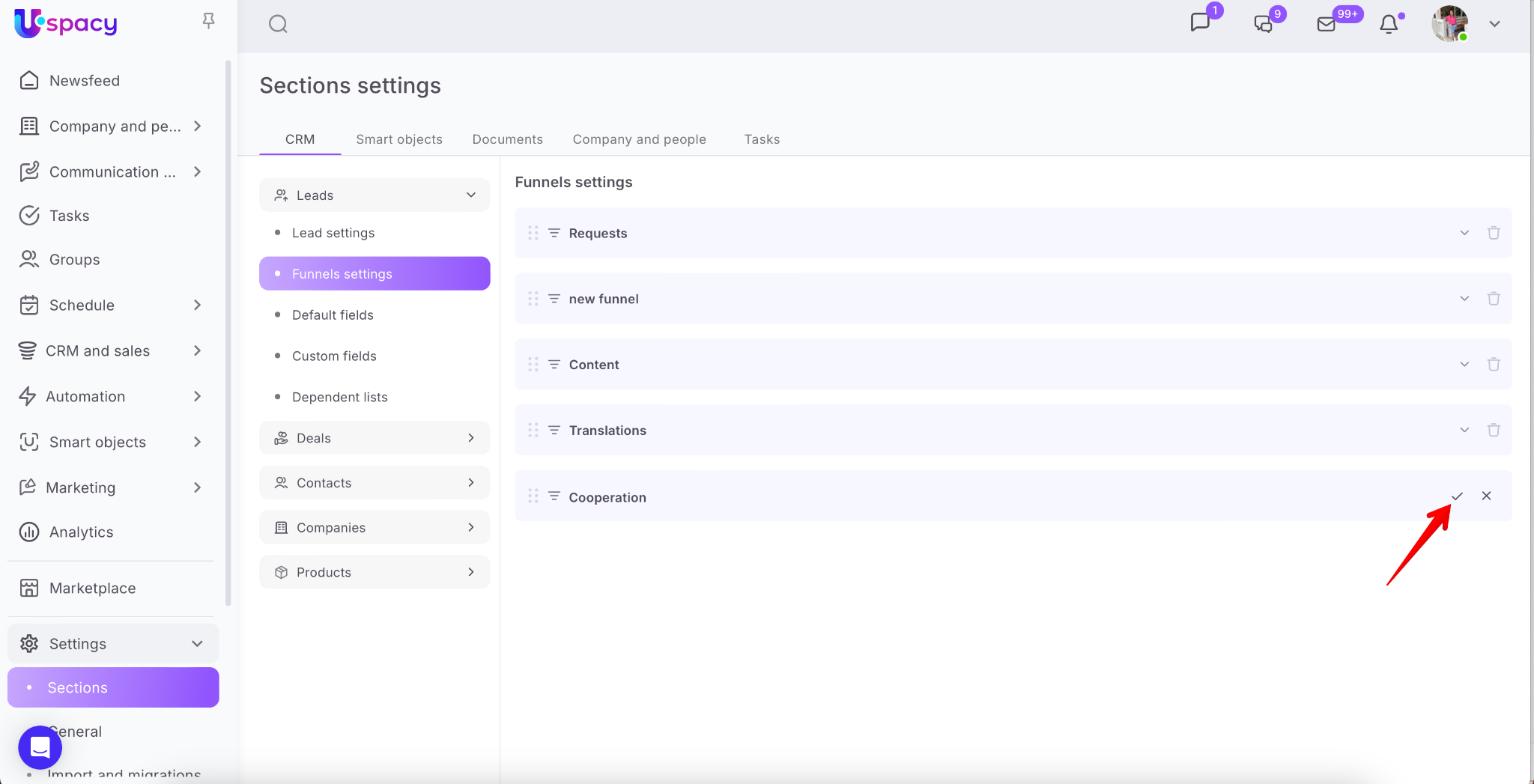
Open the CRM section, then go to either the Leads or Deals tab. In the Funnels settings section, click the Create a new funnel button.
0a97f60f-45ba-4258-91dc-2144af2bab86

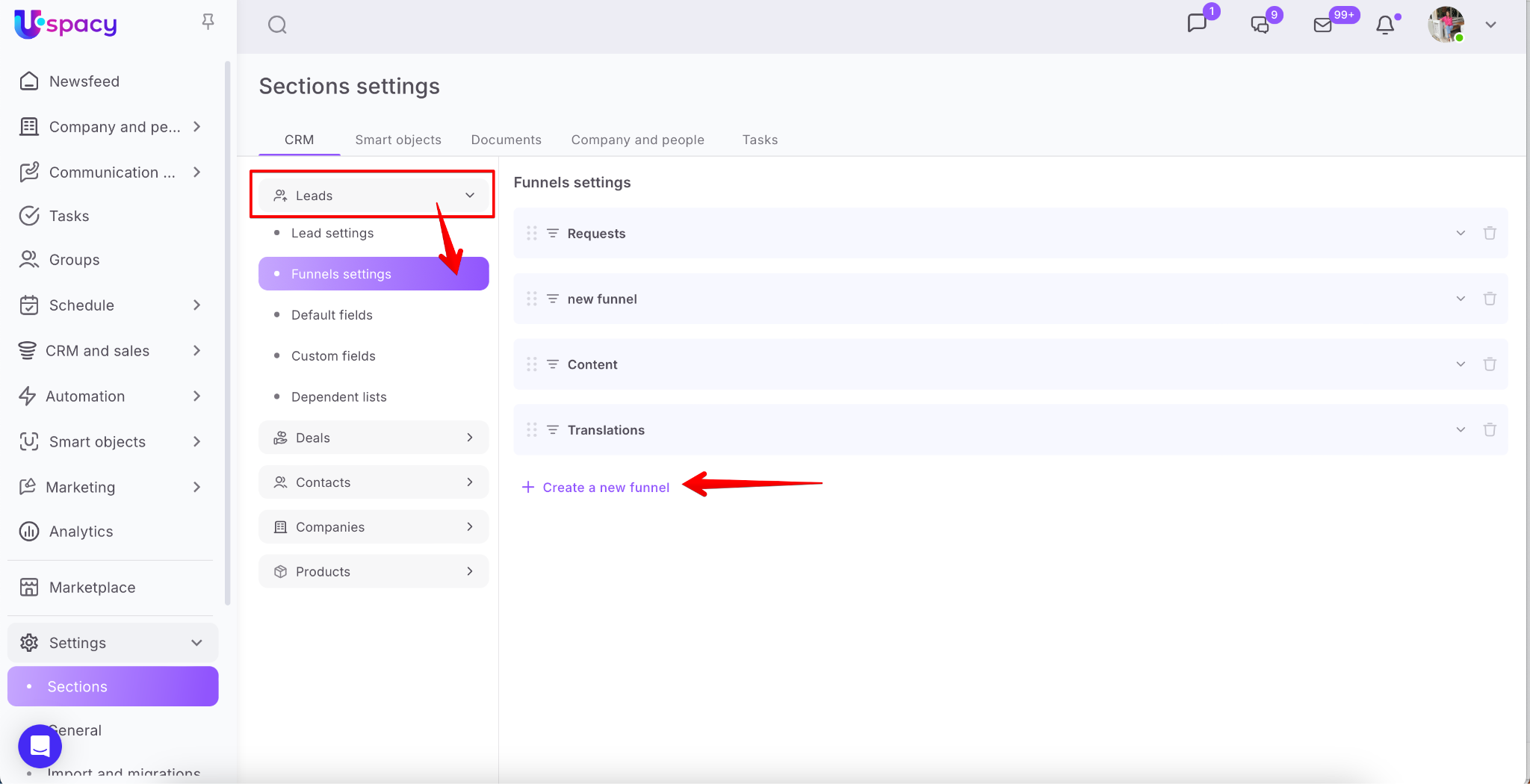
Enter the name and save.

51342e35-1e72-4a2f-84ca-f6828d8558fd

Then expand the funnel and edit the existing standard stages, add your own intermediate ones, and also specify the reasons for failure that are specific to your sphere of activity. In other words, perform similar actions as when creating on the entity page (lead or deal).
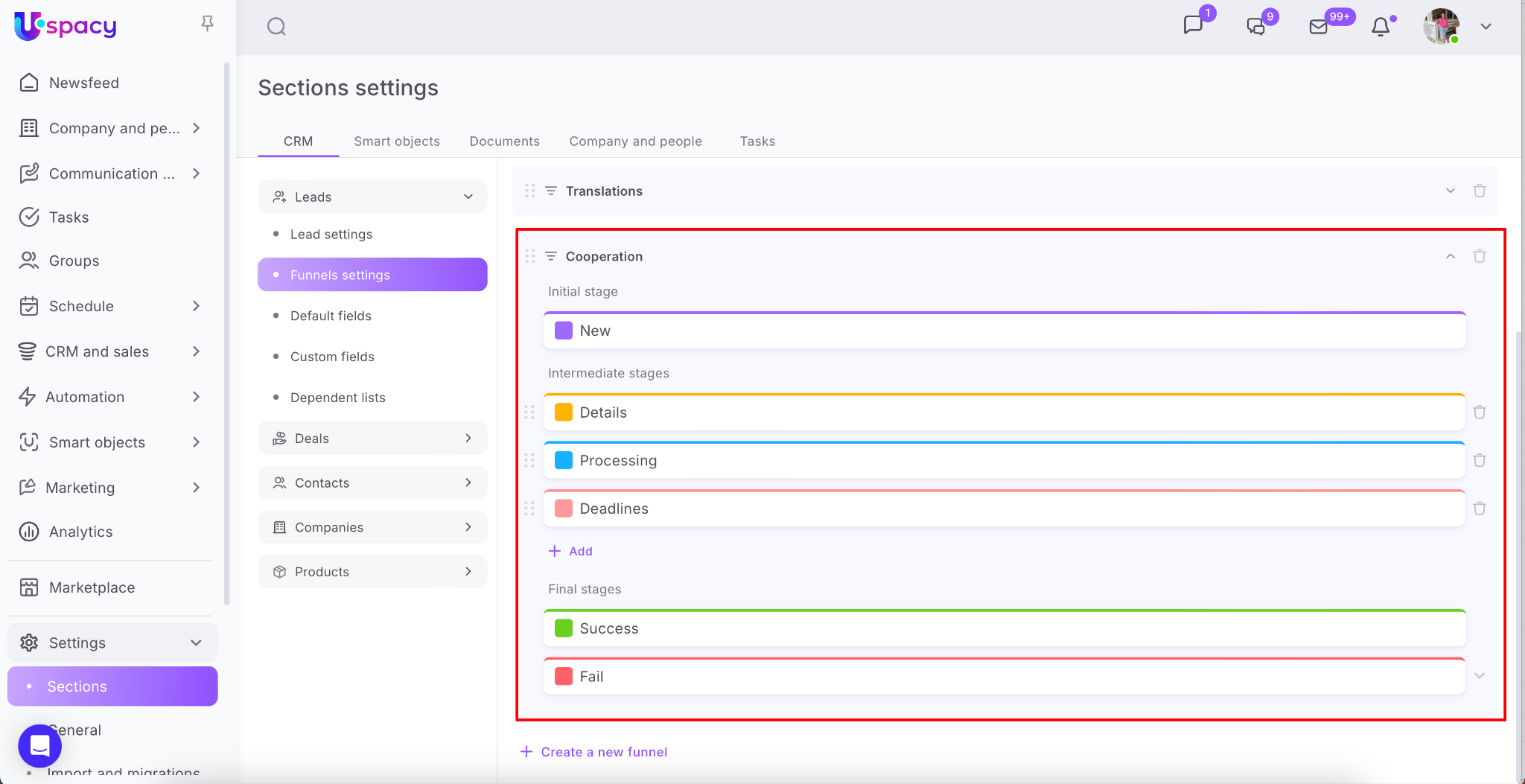
0c37c5a0-c653-40d5-b592-b669acebfb47

How to configure existing funnels?

First you need to open the funnel switcher and hover over the desired one. As a result, a gear icon will appear.

AD_4nXeRkcEJ6oT_kC8Rbh14Afnuqiy4oWTIP-Xl3j-Nv1shP9Wwwk4NdHj54ZXgSRwumxV5TwLTbDA5xzSe6-AivOw4ne2IAbP1ETMv4eonPLWRN_XC3Rc5C-lv_bQYyeTl-f_ghTIbBg

🌟 Only an administrator or a user with the appropriate set of permissions can configure funnels.

After clicking on it, the settings window will open. Here you can perform all the same actions as when creating a funnel. That is, edit the existing standard stages: rename them, change the color and specify the reasons for failure that are specific to your sphere of activity. And also add your intermediate stages. And, of course, change the name of the funnel.

AD_4nXca8uDX_x5DS9z0Y2yem25Z5ELU0Y1P9hWwmSyMo7zt9wdOHbfb7Xfvgv0_kGaT_-2tnK3mMIps68Ho5dAUy7yjfbyxFLuTgANFvWGhXh56W4uD18o122cXdR2SG-WPhmDI78xs

The same options are also available on the Settings – Sections – CRM – Deals or Leads – Funnels settings page.
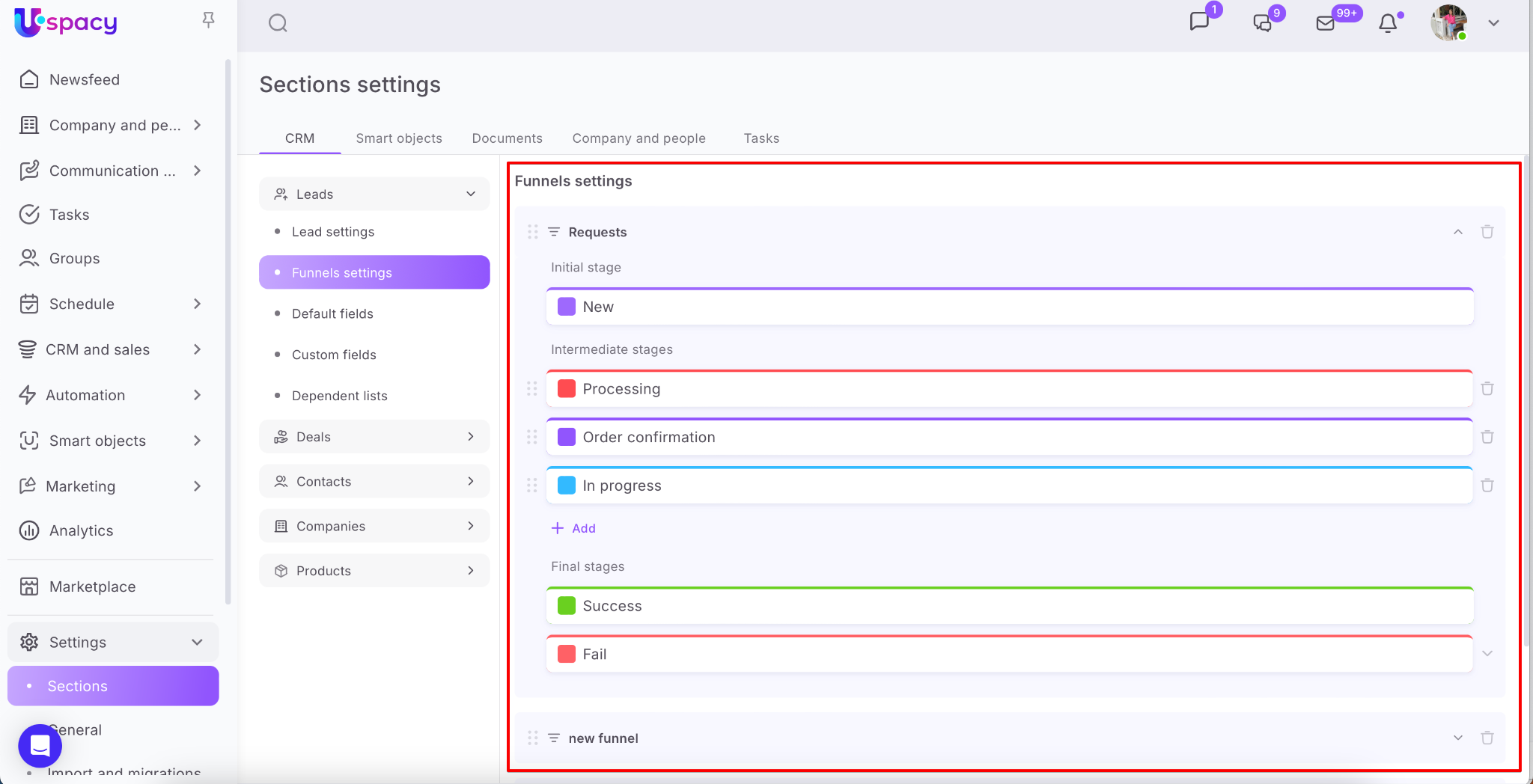
0a5c0e95-5398-478d-9416-63bd96c7c39d

How to delete funnels and stages?

To delete a funnel, you must first go into its configuration mode.

AD_4nXciiDalIT6KFjgnRigSMFEx4AixiJS9E2ebPLDPWLQAOXRJNJk7s2UKTx_mmUNRsG-Fmoal2oaNxKMDQKzb7Ekzm7KlLGGqYCw4nlzo6RP1d363Qt2WKNvsh98ddhDeBRrnQ2Umvg

🌟 Only an administrator or a user with the appropriate set of permissions can delete funnels.

Next, call the interaction menu and click Delete.

AD_4nXdx65lULoH751i-Pfu_uaOT6ruvhiEeVGGXhZ1-KjOOTaMKvbbOpBoFAp74GvAs2UXWmkpPUSGD3MVDtybmyQTszx69y29lFfOBlGTHfbgLdFGS7nqfrRP-zgykQIC37uO0fB0sOw

And confirm your actions.

AD_4nXc2EeKiYWjA9sj2d_0kCA37hhGeNGf2E0f2dAMfj7OGsGu2uyiOqQTNbqHzSvTZOarU5UMgdcd4vG-TYfmU7wwrjIkTx6TeBzb4NmKF4VP8kxbaC2-Eb2RVRUrs4eVANffPW3N7tw

❗️Please note that if the funnel contains deals, it will be impossible to delete it.

AD_4nXd8h_COiSvVlMfo_u--I-XqT1BYi0XPcTOT1KxQ2ZmXIfB49nreO8GsnCfH8LuPiA9drKaEShdmQ2ub_u77gFOLee9uezj1O7LOjq3SGHcGgBkq6JW41tTXm-_4IXgFZ0Bi_Qk9Ng

Be sure to check the filters before deleting the funnel to ensure that it doesn't contain any elements.

AD_4nXdrgJyBXAvBR6fjgTwwpnoHjgwt9zSNoseG_k_aLbPn6aexoF94bR9lKmVHrZidDFFob2781dAW7IOtauPB3sIHv9ggKc2jPRBf2-nBNkMn7ZWIEoeAzxSfl44PfbneW4ShzssnfwAD_4nXeQzfsTLtFAnn4V0HY_8SyUv8oO7cjc7c9y9CWcDXqARIcuCkD7ZGRgMjOJ6KxFs61XEvn7KZNJa_d9ok8O1QSq0N05wrPdyyC_Xl40XzycKCAT_DX-og_SM-yt8hPWX8enc7nQXQ

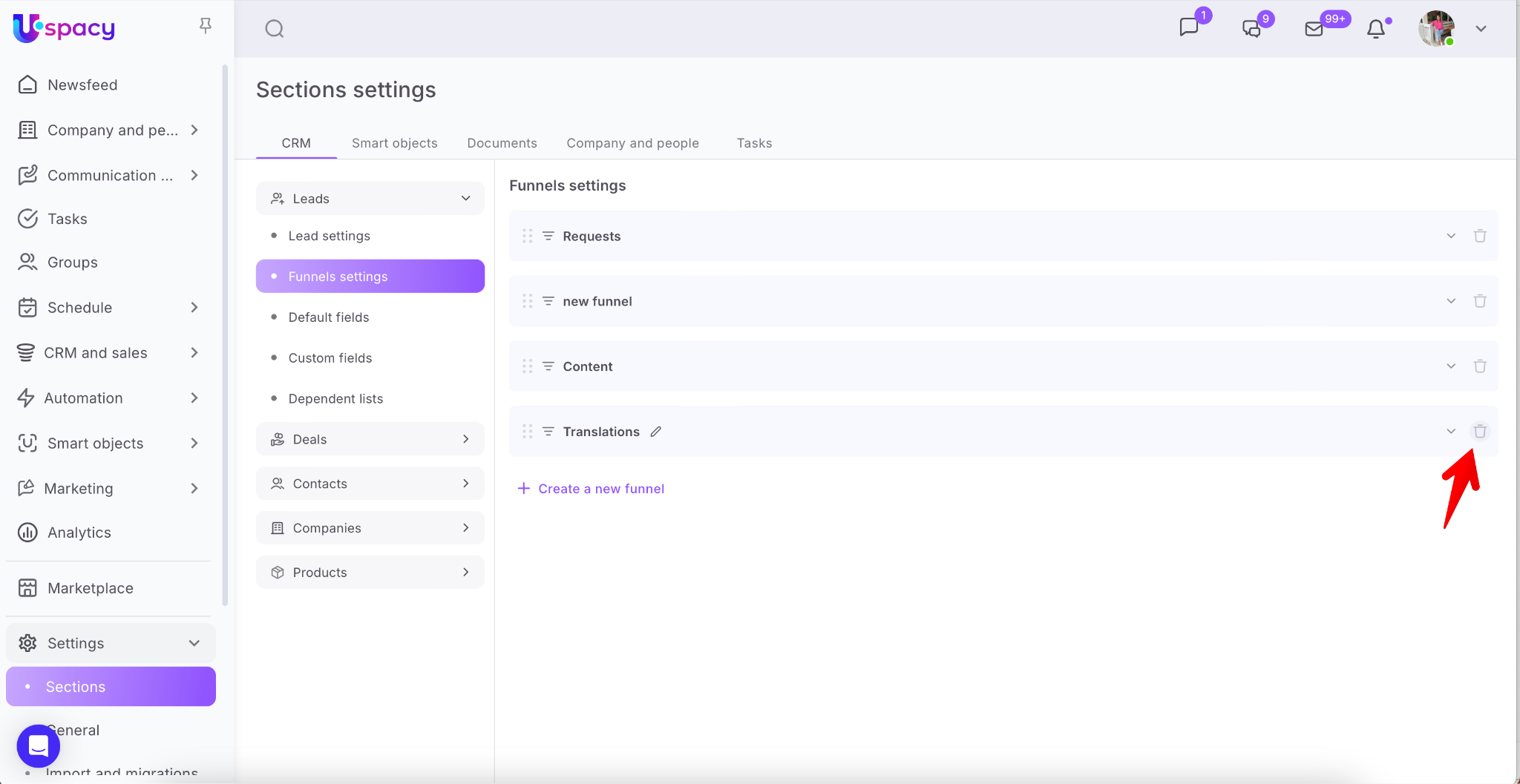
You can also delete it on the page Settings – Sections – Deals or Leads – Funnels settings. To do this, click on the trash icon, next to the name of the desired one.
007da7b0-c6e6-41fa-9ac7-f6e9b406c88a

You can delete a stage on the board. First, you need to switch to its editing mode. Click on the pencil icon that appears when you hover over the stage name.

AD_4nXcUhuRGkgF85QCL1_cC0-56lnuoNP7a69Mo3DGKer8e5dn6EMtmxMhgfzmXqL75iRlc1dUIwoOZfkNNlkcW-eV1xePGJJlb7hAiwwYrNMdT-XIekhrd5BlYdHKXOFNTAaxIJt98og

🌟 Only an administrator or a user with the appropriate set of permissions can delete stages.

Then click on the trash icon.

AD_4nXfu071IbiPaYr6GG20X8dvFDH2Lqg_o3W6NYIU96euT20FO__N5GC_zGv5IH9Uk97n8jJ9_1ii3g-GY8QAP4y-I7eDpuiCRQP9T2kq3lJuBI5xmHzPw-F2qtGZ1-_o8tl1Dm6AFEw

If you try to delete a stage that contains elements, you will receive a system message.

AD_4nXeIqvzJC0UnlWNWTgAGOYxGbVaiqVEeVkbOnYXFqFpl8oGHIs2pzJb3u_JTE2uayklNfoUl5UV1AIKT-toqeOtnlqYmXtQ8OZaEOnJaieSmvJSCWmGZrJDxv2wILClP_SZrefT2ug

To successfully delete a stage, it must be empty. So clear it of deals first. And then proceed to the deletion.

❗️Pay attention! Check the filters when deleting an empty stage to make sure that there are definitely no elements attached to it.

AD_4nXehCj3uYfuLu-BMzzBWXHIf9NUC5sWvOIk9UTg29gy_P-UT7RV2FM-ZixWlCJF_YTAJUvmQ25H9BVCMowf4UCwA17f1QkVSuzGe-W_HCcFVPJ5u5Vw_Jm2y4KbsBjm0iOK8E7zp

The element counters will serve as a hint. For example, you might want to delete a stage that initially appears to be empty.

AD_4nXe12mQ_b70oy08bdqMxbcLD-8tRU7XJEksLV050ltRTjWfD1xiAYHTtmLaf0zLHCUmc7cERgANmc-Ullr1D1bogUxA5H8X-4jdsczlMeowuC9-30SgS9u0ys57HFNEd6bpkdlq-zQ

However, if you reset the filters or adjust them, you may see what the matter is actually. The counters will give you a clue about this.

AD_4nXfc-1x3SKPbJa8nkEkFS3skFgYNPyGfWXwOajPta-PpWw_hR0zPcYqXDUs8xf13tFHKzUNVq5k79BBNn6kGJWzAZITGtwOP3ZeCaP6NXDZJ0IXnU3qw1RFn7B5JSsGk-zs5dX0xWg

How to work with funnels in lead and deal cards?

When creating either a lead or a deal, you can assign a funnel to the element and select the desired stage within it.

AD_4nXf4VFu7S7HNs1BhNgDaTiIYH-WRJ7Yh-alcVUAlm9BpCeETcloGZzo00CATO0km6JThL-kstJpsnM481KucMNjkf2MgnjV8QG-DrZ7M574AlSaKOsUnpnfgWyxIcFzOEotK9nuv_wAD_4nXfHC0w_SbxYFCdJeJ7snKy1Alabj3L4Kg6tgnc2AJDMs4wbfGsxiVKdmT6-Z5YGZTstzuoJct8kGxVbZWabo0YBdqCeRs1ER2neJvZXd1UBC6qGapbNFuGiAIl1X9bGiB6_OY4QiA

💡 A special note for leads: When creating leads, you cannot select the final stage in the funnel.

AD_4nXeNHmxlVwQ1_mRRbQ3CSpNMMNUQdsEXUiNfTf0nGKrp51IDmk7thdlakhDtlhiQjFBMqA9ZiJ33pBZCKFFN0cnKPn3cZ4n3xv_7H_zjKo-JX1wLXEx1e4szYqO-Mm6vv9kAF641AD_4nXcCA9UzwtDZsj_8s6TNYKQ4Iuo8TARZxYJGz3z5F5Cu8l85fyGUnhNwT3LOegLuJp99mI54-lg44N5-BCO5XmKQOt1cQdXB5e0Wkr0fVt6Y0bN9T9cVMrqr-23oK0sGEwpG8_bmpA

To ensure that the card (2) opens with the correct funnel (3) when adding an element, select it using the toggle (1).

AD_4nXebzQgaIzEaU9tEd3bqeLVl7wAV-S0mWBCBS2DFOszK8t9S-TFdo85BtI36UeBLZBJb6320HIYI99SkmNx5x3ohlgB3NBypPHP4wMvxFUs9TYyDpaBrc0eS2XFeYIUlh2ESPrkkXgAD_4nXdiIJhziyykFJC_HO5UGSI_SudyaVuNggvRyQto2UWoavGLJCqeHwW6vsuHiXBZVDWldizmpqwcIkzUHFOM-IqcI-33iNFS6VEW6Dj8xeeitvWxX9u1mg2kBpGuPjrFP2mb7HK_8w

Of course, the funnel for a lead or deal can be changed at any time. However, note that since this action involves editing, you will need the appropriate permissions.

So, go to the card of the required element and click on the funnel selection block. Then, assign a new funnel and select the stage.

AD_4nXf0Lis41WcjHv4DEjJjeEkTyLxSbl5rj4k4VkgHg4pROmWxc-adMcvku7QYkfiJUBpGMOWO0SqPL0hwpz6aIbi-aKkmUoBAzmM4tvLD3AIosFm8aSbb9tqybTv8MN6g4-CJ7YUKSwAD_4nXfdouhzzxosX-flnKI_cHFovOlhcxt8GE8z4WKSdybTMkKshKc053LS-RM3tJ1HQWCYf0t3wyT-X7tPxMER0oK4YVu6A6fSnqv_whlucZkwMRA475qjTVT0eo_bgHdVtTaweRe4-Q

And, of course, don’t forget to Save. Done!

AD_4nXdUKgPYko_tkSVH7ZmjZOnCqvP4UK9dvbVvf0i7ze7WP6JfnZGuHJujtWD5ImsiKDvaWLA3ZTzfxEezoOlNk6SIlMm1eqk_oZ-oI-fygreSVVgibzCK8sCsBtHkrqfLOW5sIvW7Mw

If you have additional questions or you need to contact the support, send a request to this email [email protected]

Created: May 4, 2023 / Updated: September 17, 2025