Telegram integration with CRM in Uspacy
Telegram for business is a fast and familiar communication channel where customers can ask questions, clarify order details, request consultations, or seek support. However, when messages remain in managers’ personal chats, teams can easily lose context, conversation history, and visibility into customer inquiries.
Telegram integration with Uspacy lets you receive messages from the messenger in a single Workspace. Your team can manage conversations through External Channels, link interactions to the CRM, and see how Telegram inquiries turn into sales, service requests, or follow-up tasks.
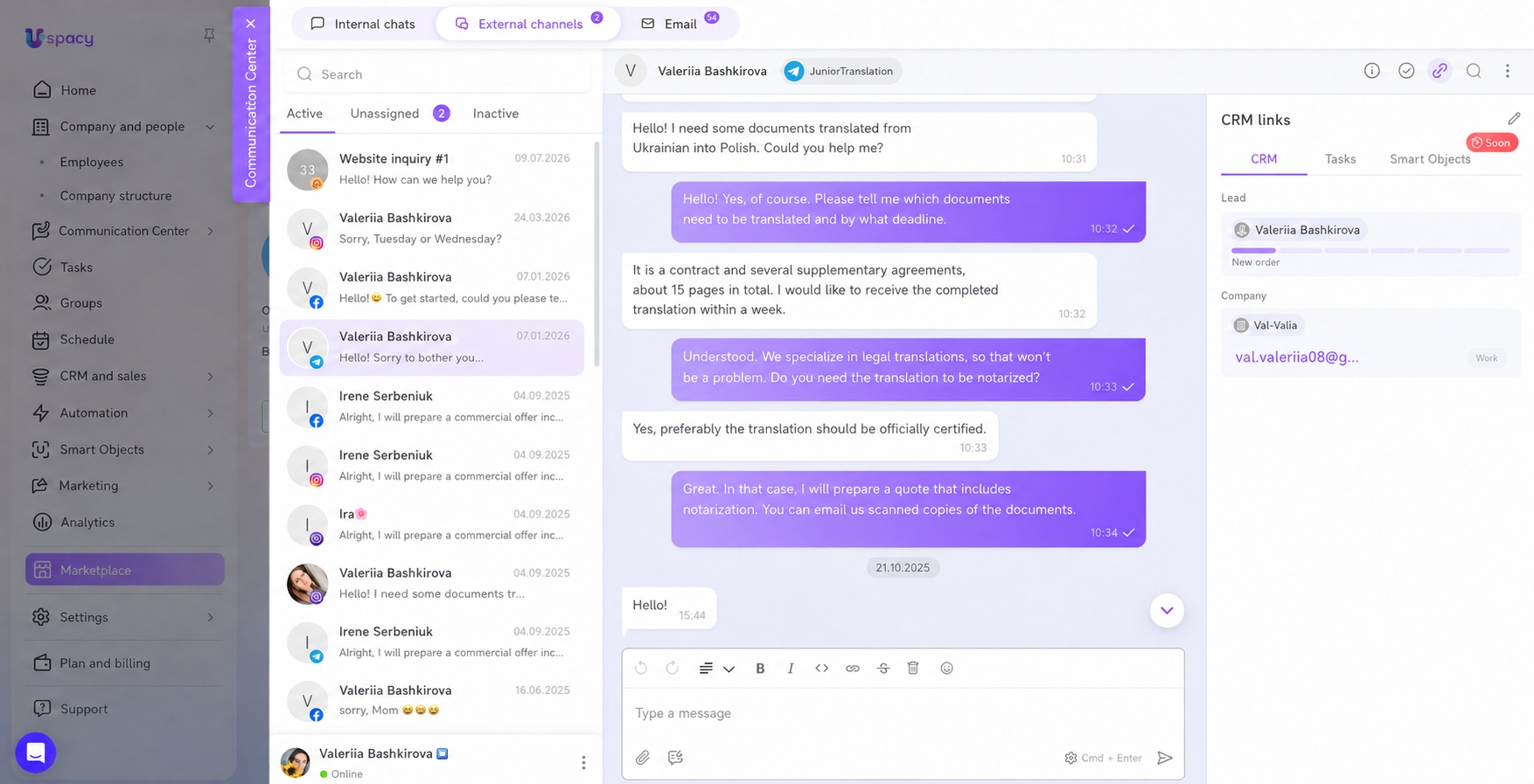
All Telegram inquiries in Uspacy External Channels
Customers send messages via Telegram, and those Telegram messages appear in Uspacy. The manager sees the new conversation in Uspacy External Channels, takes it into work, and replies to the customer directly from the Workspace chat.
This way, customer chats in Uspacy become part of your workflow rather than isolated conversations in a messaging app. It’s especially useful for sales, support, and customer service teams that need to respond quickly to Telegram inquiries without constantly switching between different applications.
If your team is looking for a way to receive Telegram messages in a CRM or reply to customers on Telegram directly from the CRM, this integration makes the process much simpler. Telegram chats in the CRM keep customer conversations alongside customer data instead of leaving them scattered outside your team's workflow.
Telegram bot for fast customer communication
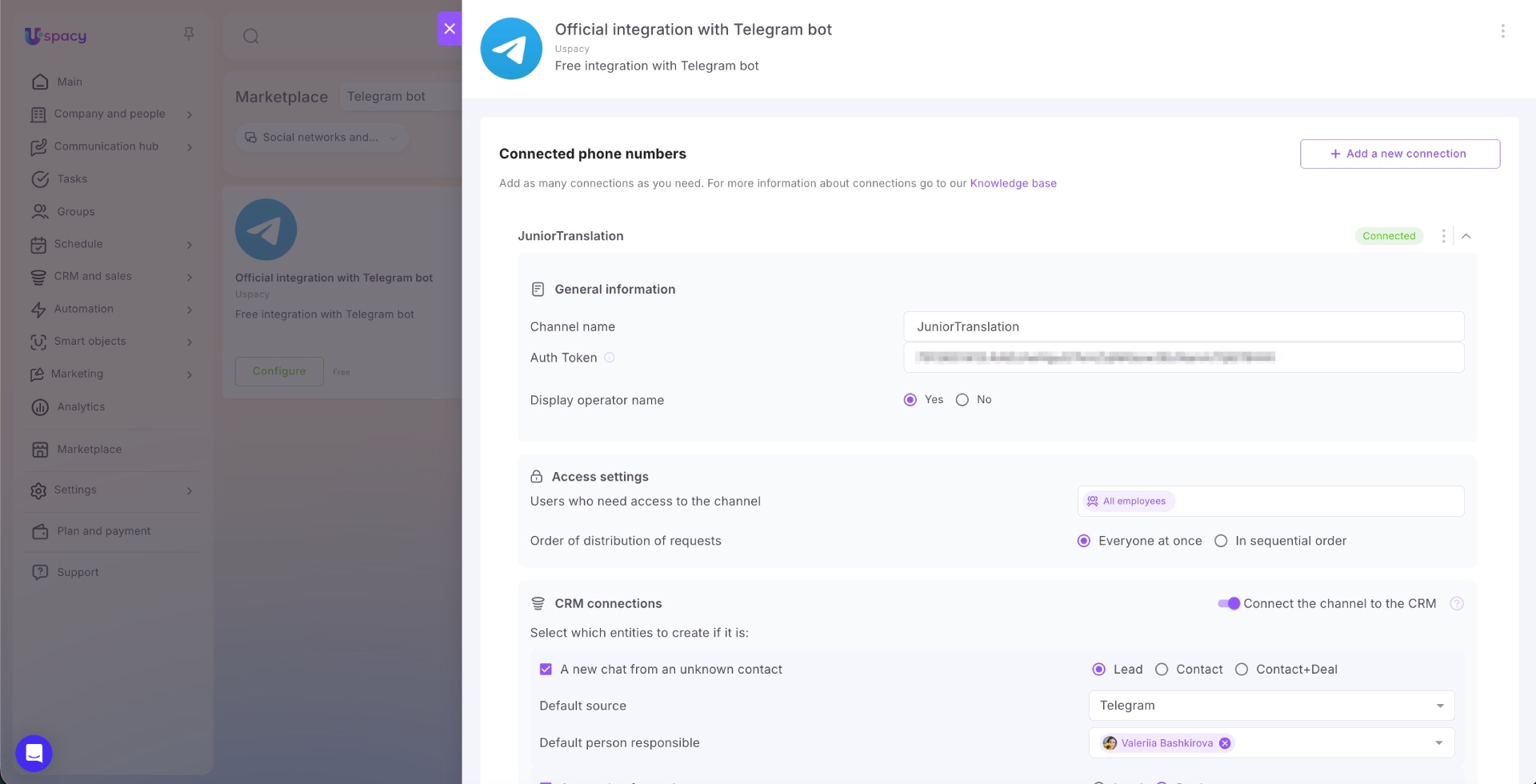
To connect Telegram to your CRM, you need a bot and its Auth Token. The free app is available in the Uspacy Marketplace, so you can add the channel to your Workspace without complex technical setup.
If you already have a Telegram bot, you can use it for the integration. If not, you can create a new one and configure it to work with Uspacy, allowing your team to receive customer messages in a single workspace.
A Telegram bot for CRM helps organize customer communication in Telegram within Uspacy instead of managers' personal accounts. As a result, connecting Telegram to your CRM becomes a straightforward process: create a bot, obtain its token, install the app from the Uspacy Marketplace, and start managing conversations directly in your Workspace.
Linking Telegram chats to CRM: leads, contacts, and deals
Telegram CRM integration for sales is valuable not only because it enables faster responses. Its greatest advantage is that every customer conversation can be linked to CRM records, including leads, contacts, companies, and deals.
This gives your team more than just an isolated chat—it provides the full customer context. Linking chats to the CRM preserves the conversation history, helps managers understand the customer's needs more quickly, and makes it easy to continue working within a structured sales or service process.
Depending on your configuration, Uspacy can help create or link CRM records to conversations. For example, you can link a Telegram chat to a CRM lead or set up automatic lead creation from Telegram chats, ensuring that every new inquiry becomes part of your sales process instead of remaining just another message in the messenger.
Team collaboration without the chaos of messaging apps
A CRM for Telegram should help teams work systematically instead of transferring messenger chaos into another tool. In Uspacy, inquiries are managed in a single Workspace where teams can see active conversations, responsible employees, and follow-up actions.
For managers, this means greater control over customer communication, while for teams it means more structured conversation management in Uspacy. You can configure employee access to channels and decide how new chats are distributed: among all team members at once or in a round-robin order.
This makes it easier for teams to understand how to avoid losing Telegram inquiries and how to manage Telegram requests in Uspacy without the chaos of managers’ personal accounts. As a result, the Workspace becomes a unified team workspace and a single place for Telegram and CRM communication, where conversations, customer data, and follow-up actions are connected.
Telegram for customers, Uspacy for structured team work
The Telegram integration with Uspacy helps businesses respond to customers faster, avoid losing inquiries from the messenger, and manage communication where the CRM, team, and daily processes are already in place. It is a convenient Telegram CRM scenario for companies that want to see not just messages, but the complete customer journey.