CRM and communications: How not to lose a client between messengers, email, and calls
December 10, 2025
6-minute read

Dmytro Suslov

When chats, calls, and emails are scattered across different services, not only messages but also money gets lost. Uspacy unifies communications and CRM in one place so that no client slips through the cracks.
Sales are increasing, but so is the digital chaos. With Viber, Telegram, WhatsApp, Instagram, Facebook, website chat, telephony, and email, it can feel like there are more clients than there actually are, since each interaction exists in a separate space.
A typical situation: a client messages you on Instagram, calls the next day, and then duplicates the request by email. In each channel a different manager responds, promises get lost in private chats, no one creates formal tasks, and someone inevitably forgets to call back or send an invoice.
For small and medium-sized companies, this is especially evident. Teams are small, roles overlap, and managers are overwhelmed by dozens of chats and calls, leading to quick burnout. The owner discovers the chaos not through analytics, but through clients leaving, negative reviews, and lost deals.
To stop losing clients in communication noise, you don’t need a new messenger — you need a system: a CRM with a unified communication hub. Below, we explain what this means in practice.
Unified client communication hub in CRM: A simple explanation
A unified communication hub centralizes all client inquiries. Chats, calls, emails, and website requests are stored in the CRM, ensuring the complete history is linked to each client or deal.
The principle is simple:
- One contact database instead of Excel sheets and personal notebooks.
- Connected messengers and social media through work accounts.
- Website chat and forms automatically create inquiries.
- Telephony and email are integrated with the CRM.
- No inquiry remains anonymous — the system assigns it to a specific client or creates a new record.
A new manager can review the record and understand the full context in minutes: who interacted, when, the discussion topics, promises made, and past purchases or issues. The CRM highlights team response times, client wait points, and underperforming channels.
Now that the concept is clear, it’s worth exploring which channels should be combined into one hub to get a complete picture.
Key channels to unify: Social media, email, and CRM forms
Fixing each channel individually won’t create real order. You need to see the full picture of communications and connect it to the CRM as a single source of accurate information.
It’s critical to unify the following channels:
- Messengers and social media — before: managers’ personal accounts; after: all chats are linked to contacts in the CRM.
- Email — before: messages are kept in employees’ inboxes; after: correspondence is stored in client and deal records.
- Telephony — before: promises were forgotten; after: every call is recorded in the CRM with outcomes and call logs.
- Website chat — before: requests get lost in the widget; after: inquiries become leads in the sales funnel.
- Forms and landing page requests — before: spreadsheets on the marketer’s desk; after: all submissions automatically go into the CRM.
When all these channels are managed through the CRM, the company no longer relies on personal chats or the organizational habits of individual employees. The next step is to understand the value of a unified interaction history for the business.
Benefits of a unified client Interaction history for business
A unified history in the CRM ensures that the company’s knowledge isn’t stored in managers’ heads—it’s captured in the system. Each new interaction builds on the last, making service consistent and predictable.
Key benefits:
- Consistent service, regardless of the manager — anyone can pick up the conversation without repeating questions.
- No duplicated responses — clients receive a single, consistent company message across all channels.
- Faster responses — no need to track “who handled the client”; simply open the CRM record.
- Transparency for management — managers can see the volume of inquiries, response times, and bottlenecks in the funnel.
- Fewer mistakes and conflicts — call and message logs allow you to restore what actually happened in the conversation.
- Foundation for analytics — understand which channels are working and how communication affects sales.
These benefits might appear “soft,” but they tackle real, everyday challenges. Let’s examine the specific problems that a CRM, together with a communication hub and telephony, can solve.
Common challenges solved by a CRM with a Communication hub and telephony
For most teams, the issue isn’t the number of leads—it’s the chaos surrounding them. Some inquiries are handled, some get lost, and some never even make it into the sales funnel.
Typical problems include:
- Contacts and conversations scattered across messengers and personal accounts.
- Lost leads due to missed calls or unread messages.
- Duplicated work when two managers assist the same client in different channels.
- Lack of a complete view of the client, including discounts, agreements, and conflicts.
- Difficulty monitoring communication quality and detecting problems too late.
Without a CRM to centralize all communications and calls, a business relies on intuition instead of data and processes. Next, we’ll explore how Uspacy transforms this scenario.
Uspacy: One platform for CRM, Communication hub, and telephony
Uspacy is a set of tools for managing both sales and communications—not just an isolated CRM. In a single workspace, it brings together CRM, tasks, integrations with telephony, email, and messengers, as well as no-code and API options for extensions.
For communications, the key features include:
- All connected messengers and social media appear in a single window and are linked to contacts.
- Website chat creates leads in the CRM and stores the full interaction history at every stage.
- Email inboxes are integrated with the CRM, and messages automatically appear in client records.
- Integrated IP telephony logs calls, allows calls directly from a record, and stores call recordings.
- A unified client record contains emails, chats, calls, tasks, deals, and internal team notes.
- Automated task and deal creation — inquiries can automatically generate tasks, activities, and deals, and trigger simple processing workflows.
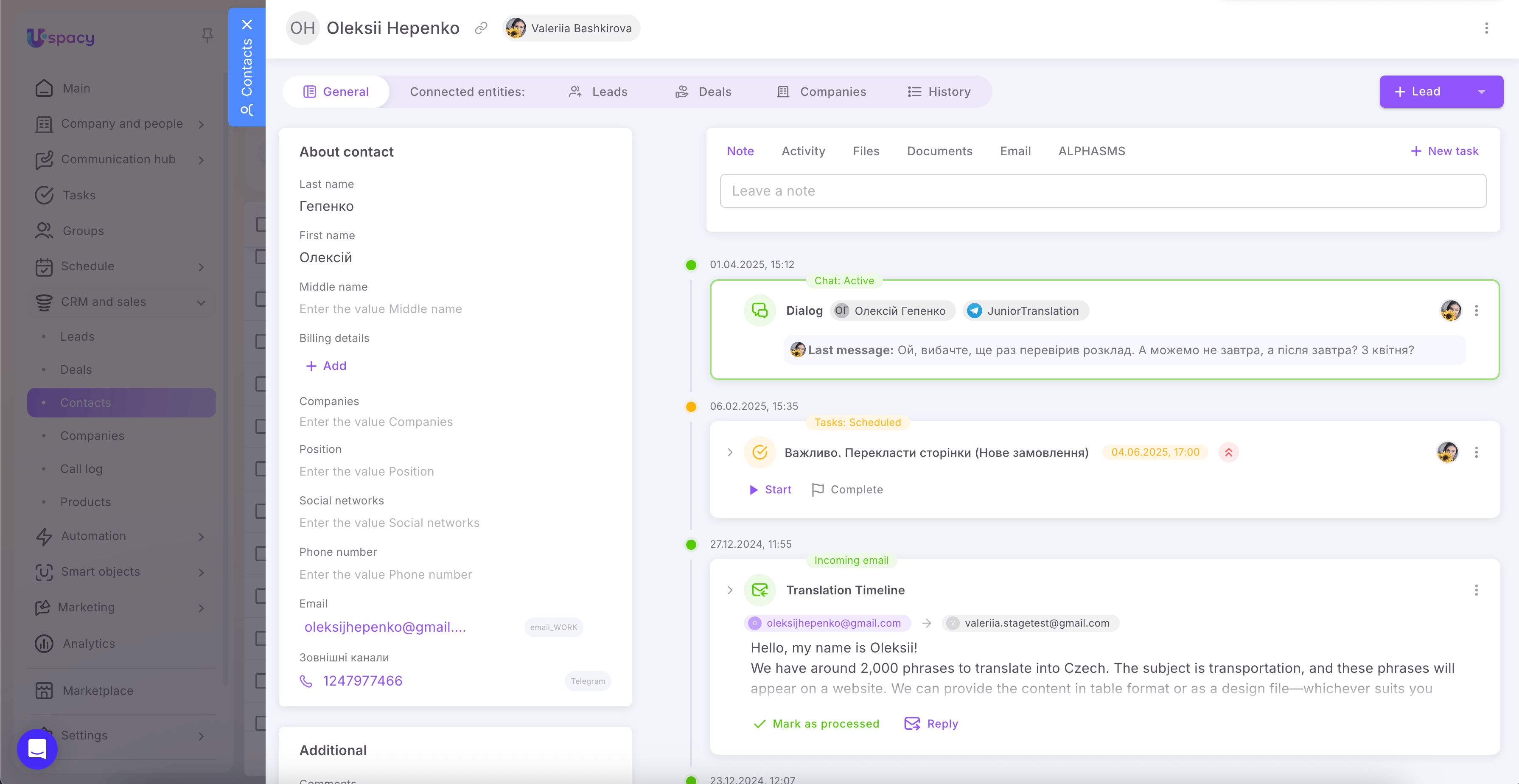
The team works within a single interface, without switching between tabs or keeping important agreements in personal chats. The remaining question is how to properly adopt this model.
Step-by-step plan to set up a unified communication hub in Uspacy CRM
Even the best system won’t work if it’s treated as “just another app.” A clear, step-by-step implementation plan is essential.
Practical steps:
- Analyze current channels and points where inquiries are getting lost.
- Define what an ideal client record should look like and map the lead journey in the CRM.
- Connect the necessary messengers, social media accounts, email, and telephony to the Uspacy workspace, and create your own chat widget or CRM forms to add to your website.
- Set up rules for distributing inquiries and workflows for handling them in the CRM.
- Train the team to work exclusively through Uspacy and reinforce this with measurable performance metrics.
The main change is moving client information from personal chats into the CRM. If needed, you can easily start with a Uspacy trial and complete these steps with guidance.
Conclusion
For a client, the company is the same whether they interact via Instagram, phone, or email. Inside the business, it should be the same: one history, one database, one logic for handling communications.
A CRM with a unified interaction hub provides a complete picture of each client, reduces errors, speeds up responses, and ensures consistent service. Without it, a business constantly pays the “chaos tax”: lost leads, complaints, and team burnout.
Uspacy, as a product, combines CRM, communications, telephony, tasks, and analytics into a single workspace. If your company is already overwhelmed in messengers and emails, now is the perfect time to try the “all-in-one” approach and see how team performance improves within the first few weeks.
Updated: December 10, 2025
More materials on the topic

Forecast or guesswork over coffee grounds? How to plan quarterly sales using Uspacy data
April 10, 2026

Chaos, eliminated: How a unified document registry in CRM saves deals and hours of work time
April 8, 2026

Forgotten appointments and lost revenue: How automated reminders prevent client “amnesia”
April 6, 2026
FAQ
What is a unified customer communication hub in CRM?
Which channels should be integrated into the CRM first?
What business benefits come from a single history of customer interactions?
Uspacy is improving and developing at an incredible speed
Learn about product development plans
Uspacy roadmap 🚀