Excel vs. CRM: Signs it’s time to move beyond spreadsheets
December 29, 2025
5-minute read

Dmytro Suslov

Excel may be excellent for budgeting, but in sales, it turns your client database into a fragile, unprotected file. Five simple signs can reveal when spreadsheets are slowing business growth and when a CRM becomes essential.
For most companies, Excel or Google Sheets is the first tool for organizing client database. It’s free, familiar from school or university, doesn’t require a CRM implementation, and feels like a “temporary solution.” But temporary often stretches into years, while data grows, the team expands, and the spreadsheet turns into a minefield of chaos.
Problems start when spreadsheets scale alongside the business. Data volumes grow, more team members get involved, and multiple versions of the same file emerge. Before long, familiar questions arise: “Who changed the formula?”, “Which file is the most up to date?”, “Why wasn’t this client contacted?”
Excel stores data as static rows. A CRM manages relationships — it tracks interaction history, shows deal statuses, reminds managers of next steps, and protects the client database. Sales are a dynamic process, not just a list of contacts, which is why the “one shared spreadsheet” approach quickly reaches its limits.
Spreadsheets remain a great calculation tool. But managing client relationships, building sales automation, and scaling a business are far easier with a CRM than with a file stored on a drive.
The real risks of managing clients in spreadsheets
If you look at Excel objectively, the biggest risk isn’t formulas — it’s the fact that your entire client database depends on one or two files and human discipline. For a small team, this may still work. For a growing business, it doesn’t.
The core issues look like this:
- Data security is essentially nonexistent. A manager leaves the company, copies the file to a flash drive, or saves it to their personal Google Drive. In practice, there is no real control over this.
- There is no complete interaction history. A spreadsheet shows whether a client “bought” or “didn’t buy,” but not how many calls were made, what objections were raised, or who last communicated with the client.
- Human error goes unnoticed. One accidentally deleted row, a shifted column, or a typo in a phone number — and the client is lost with no reliable way to restore the change history.
- Version control turns into a nightmare. Files like “Client_Database_new_final_v3_actual_final.xlsx” exist side by side, and no one is sure which one contains the latest data.
- There is no process — only a list. Excel can’t remind you when it’s time to call a client, can’t assign tasks, and can’t show a sales funnel. It only stores static rows of data.
In Excel: a manager accidentally deletes the file “Clients_March” and never mentions it.
In a CRM: every action is logged, deletions are restricted by permissions, and the database is protected by roles and recovery options.
For a company where the client database is a core asset, these “Excel limitations” stop being a matter of convenience and become a matter of business survival.
CRM vs. Excel: Capabilities Excel can’t match
A CRM doesn’t work with spreadsheets — it works with processes. Every lead follows a clear path: received → processed → agreed → closed → retained. Excel only shows a point-in-time view, whereas a CRM preserves the full interaction history.
The main benefits include:
- Integrations and automatic lead capture. A CRM receives inquiries from websites, forms, Facebook, and messengers. Leads automatically enter the sales funnel instead of appearing on a new sheet.
- One-click calling. In Excel, you copy a phone number, paste it into your phone, and only then place the call. In a CRM, you simply click the phone number in the client card — the call starts immediately and the conversation is recorded.
- A complete client profile. Emails, calls, manager notes, invoices, and files are all stored in one place — not spread across multiple folders and browser tabs.
- Tasks and activities. A CRM prevents missed follow-ups by assigning tasks, highlighting deadlines, and showing overdue steps in each deal.
- Analytics for management. You can see who closes deals, where the funnel is inefficient, and which lead sources generate revenue — not just inquiry volume.
In Excel: to prepare a report, a manager collects files from each team member and spends an hour consolidating them into one table.
In a CRM: department-wide analytics are generated in just a few clicks, and Uspacy displays the sales funnel, channel performance, and team workload in a single interface.
Uspacy combines CRM, tasks, communications, and automation. It’s not just a “client spreadsheet,” but an all-in-one set of tools for managing sales — from the first lead to repeat deals.
Reasons it’s time to switch to a CRM
There’s no perfect moment, but there are common signs that your business has outgrown Excel and is losing money due to unstructured processes.
If at least two of the following apply to your company, it’s time to consider implementing a CRM:
- The sales department has more than one manager, and data starts to duplicate or conflict.
- Preparing weekly reports takes over an hour, and the manager isn’t confident in the numbers.
- Lead volume exceeds 5–10 per day, and some inquiries get lost in chats, emails, or old tabs.
- Manager oversight relies on trust rather than a transparent funnel and activity tracking.
- Clients move from one manager to another, and the interaction history resets each time.
A CRM helps turn chaos into process: building a sales funnel, automating workflows, and creating a single client database for the entire team. Uspacy allows this transition in stages: first migrate core data, then set tasks and schedule activities, and finally integrate communication channels.
Migrating from Excel to CRM: Simpler than it seems
One of the biggest fears about moving to a CRM is: “It’s long, expensive, and painful.” In reality, the hardest part is usually not the import itself — it’s making the decision to leave behind chaotic spreadsheets.
A common migration workflow looks like this:
- Export the spreadsheet to a .csv file.
- Upload the file into the CRM using the import wizard.
- Map the fields (Excel columns → CRM client card fields).
- Check a few records and run the main import.
- All your Excel data is now in the CRM.
Modern CRMs, like Uspacy, make Excel migration painless: data is imported in a few steps, the system provides a preview, and it ensures clients are correctly placed in the sales funnel. After import, you can quickly set up funnel stages, access permissions, and basic automations — for example, auto-tasks triggered by new leads.
You can read more about importing your data into Uspacy in our Knowledge Base.
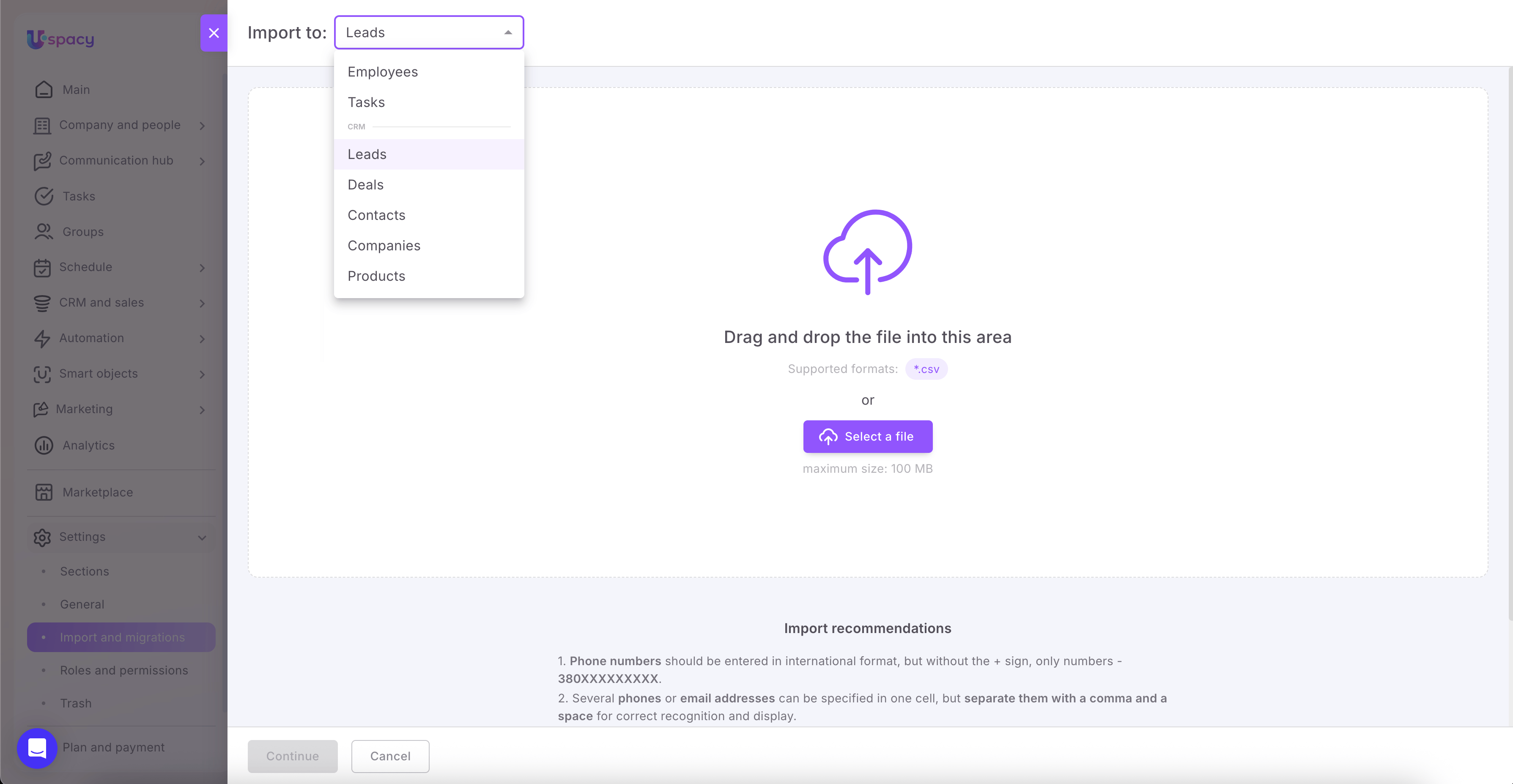
Uspacy structures its interface around the sequence “client → deal → task → communication,” ensuring teams quickly adjust to the new workflow. With in-product hints and comprehensive knowledge base support, learning takes hours instead of weeks.
Conclusion
Excel remains a powerful tool for financial modeling, budgeting, and analytics. However, when it comes to sales and managing client relationships, a spreadsheet can become more of a bottleneck than a support. It doesn’t reflect processes, prevent mistakes, or protect your client database. Staying in Excel as your company grows means knowingly limiting revenue, complicating your sales team’s workflow, and risking your most valuable asset — your client data.
Switching to a CRM isn’t a risky jump; it’s the natural next step in digital transformation. Start with an honest audit: how many leads are lost across chats, emails, and spreadsheets? How much time is spent preparing reports? How transparent are your sales managers’ actions? And how well-protected are your contacts? Once these questions are on paper, it becomes clear that Excel serves as an archive, not a sales management system.
The next step is simple: start a Uspacy trial, import your existing Excel database, and see familiar processes through the perspective of a CRM instead of a spreadsheet. Instantly, you can view sales funnels, tasks, interaction histories, lead sources, and process bottlenecks. The difference becomes apparent within weeks: less manual work, less file chaos, more control, and predictable outcomes. When everything — from lead to invoice — lives in a single tool, the question of “Excel vs. CRM” answers itself.
Updated: December 29, 2025
More materials on the topic

Forecast or guesswork over coffee grounds? How to plan quarterly sales using Uspacy data
April 10, 2026

Chaos, eliminated: How a unified document registry in CRM saves deals and hours of work time
April 8, 2026

Forgotten appointments and lost revenue: How automated reminders prevent client “amnesia”
April 6, 2026
FAQ
What can a CRM do that Excel never will?
How difficult is it to move from Excel to a CRM in practice?
Why is it risky to stay in Excel as your company grows?
Uspacy is improving and developing at an incredible speed
Learn about product development plans
Uspacy roadmap 🚀