Post-call summary email (follow up): How to prevent lost agreements and close deals faster
February 2, 2026
6-minute read

Dmytro Suslov

A single, concise post-call summary email ensures that agreements are no longer lost and deals progress toward closing predictably. Uspacy helps make this a standard practice: AI generates the summary, and the CRM stores the entire context in one record.
The most common sales failures have nothing to do with demos or pricing — they break down over small details after the conversation. Everything seems clear: the client is interested, and the manager is motivated. A few days pass, and momentum slows. Someone didn’t send the promised materials, another didn’t clarify terms, or deadlines were misunderstood. As a result, the deal stalls without clear agreements.
The core issue here isn’t a lack of intent, but the fact that verbal agreements aren’t formally documented anywhere. They live in the sales manager’s head, in the client’s memory, and across scattered notes. At the same time, the business expects predictable revenue, transparent funnels, and a controllable sales process — not results that depend on how detail-oriented a particular employee happens to be.
A post-call summary email (follow-up) turns verbal agreements into action. It clearly documents what was discussed, what was decided, who is responsible, and what happens next. This simple step builds trust, improves accountability, and speeds up deals. In this article, we’ll cover why post-call summaries matter, what to include, common mistakes to avoid, and how Uspacy automates the process with AI.
Why the post-call summary email has become a must-have
After a call, it often feels like everything has been agreed on. A few days later, it turns out each party has a different version of the conversation. The sales manager is working with one set of deadlines, the client with another. Some agreements get lost, and frustration grows on both sides.
A post-call summary email removes this lack of clarity and turns verbal promises into clearly documented agreements. It’s a concise “essential record” and, at the same time, another meaningful touchpoint in the sales funnel.
A follow-up email like this:
- captures key agreements immediately after the conversation, while the context is still fresh;
- reduces the risk of “I never said that” or “let’s start over from the beginning”;
- helps sales managers stay focused on concrete next steps rather than unclear post-call impressions;
- reinforces the image of an organized, mature team that can be trusted;
- provides an additional structured touchpoint that guides the deal toward a logical conclusion.
When post-call summaries become a standard practice — not just an “optional step for the most responsible managers” — teams spend less time buried in notes, chat threads, and personal memory. Decisions are made faster, conflicts are minimized, and conversion to closed deals improves thanks to a simple yet systematic approach.
What an effective post-call summary email should include
To make a post-call email work in favor of the deal, it’s not enough to simply thank the recipient for their time and wish them a good day. Structure is key. The reader should be able to understand the full picture in 10–15 seconds: what was discussed, what conclusions were reached, and who is responsible for what.
The basic components of an effective post-call summary email:
- Brief context reminder: Who spoke with whom, when the conversation took place, and what request or case was discussed.
- Concise conversation summary: 3–5 sentences highlighting the main takeaways and key triggers for the client.
- Clear list of agreements: A bulleted list specifying responsibilities: what the client will do, what the manager will do, and which conditions have been agreed upon.
- Next steps with deadlines: Avoid statements like “we’ll decide later.” Be specific: for example, “I will send the updated proposal by Wednesday,” or “Client will confirm the package by Friday.”
- Open questions: Items that still require additional information, decisions, or input from a third party.
- Links to materials: Presentations, proposals, calculations, demo videos — anything that helps the client make a decision, all included in one email.
- Polite closing with invitation to clarify: For example, “If I missed anything, I’d appreciate your feedback or corrections.”
A standardized structure benefits not only the client but also the team: it makes onboarding new sales managers easier, simplifies quality checks of communications in the CRM, and facilitates analyzing deal history. Over time, this type of email stops being a creative exercise and becomes a well-established business tool.
Common mistakes in post-call summary emails
A follow-up email can easily become a “checkbox exercise.” The format exists, but it delivers little value. Most of the time, the problem isn’t the approach itself — it’s in the details of how the manager documents the call.
The most common mistakes:
- Overly general statements: Phrases like “we agreed to move forward” or “discussed possible options” without numbers, concrete terms, or criteria.
- Missing deadlines and responsibilities: It’s unclear who is responsible for the next step and by when.
- Blind copy-paste from templates: The email looks like it was sent to a different client or about a different product.
- Inappropriate tone: Too casual after a tough negotiation, or too cold when the client expects a personal touch.
- Spelling and style errors: One or two mistakes can completely undermine the professional impression.
- Mismatch with CRM records: The deal in the CRM shows one set of information, while the email communicates something else, damaging trust.
- Delayed sending: The email arrives days later, when the conversation is no longer fresh, forcing everyone to recall details from memory.
These mistakes undermine the very sense of systematization that the email is meant to create. To avoid them, standardize the structure, define tone and formatting guidelines, and automate as much of the routine work as possible using AI.
How to integrate post-call summary emails into the sales process and CRM
A follow-up email only works when it doesn’t depend on the mood or diligence of an individual sales manager. It must be part of the process, not a personal initiative. After every key call, the same sequence of actions should occur: create a summary, record it in the CRM, and send it to the client.
In a healthy sales process, it looks like this:
- The call is logged in the lead or contact record.
- The manager prepares a summary immediately after the conversation and attaches it to the record.
- Tasks with deadlines are created based on the summary.
- The summary email is sent from the company email, not the personal inbox.
Uspacy allows this workflow to be consolidated into a single, seamless process without “tab juggling.” The call is linked to the record, the system stores the recording, AI provides transcription, and within seconds, a draft post-call summary is ready. There’s no need to search for templates in Google Docs, copy the client’s email, or switch between CRM and email — the entire workflow is available in one workspace.
From there, it’s a matter of discipline and rules. The post-call summary should become a required step before moving a deal to the next stage: no summary, no progression. Managers gain a transparent history of agreements without micromanaging, and the team gets a clear standard that’s easy to scale for new hires.
How Uspacy automates post-call summary emails with AI
Manually writing post-call summaries works, but it’s time-consuming and subject to human error. Uspacy adds artificial intelligence to this process, embedding post-call summaries directly into daily CRM workflows instead of treating them as a separate “special project.”
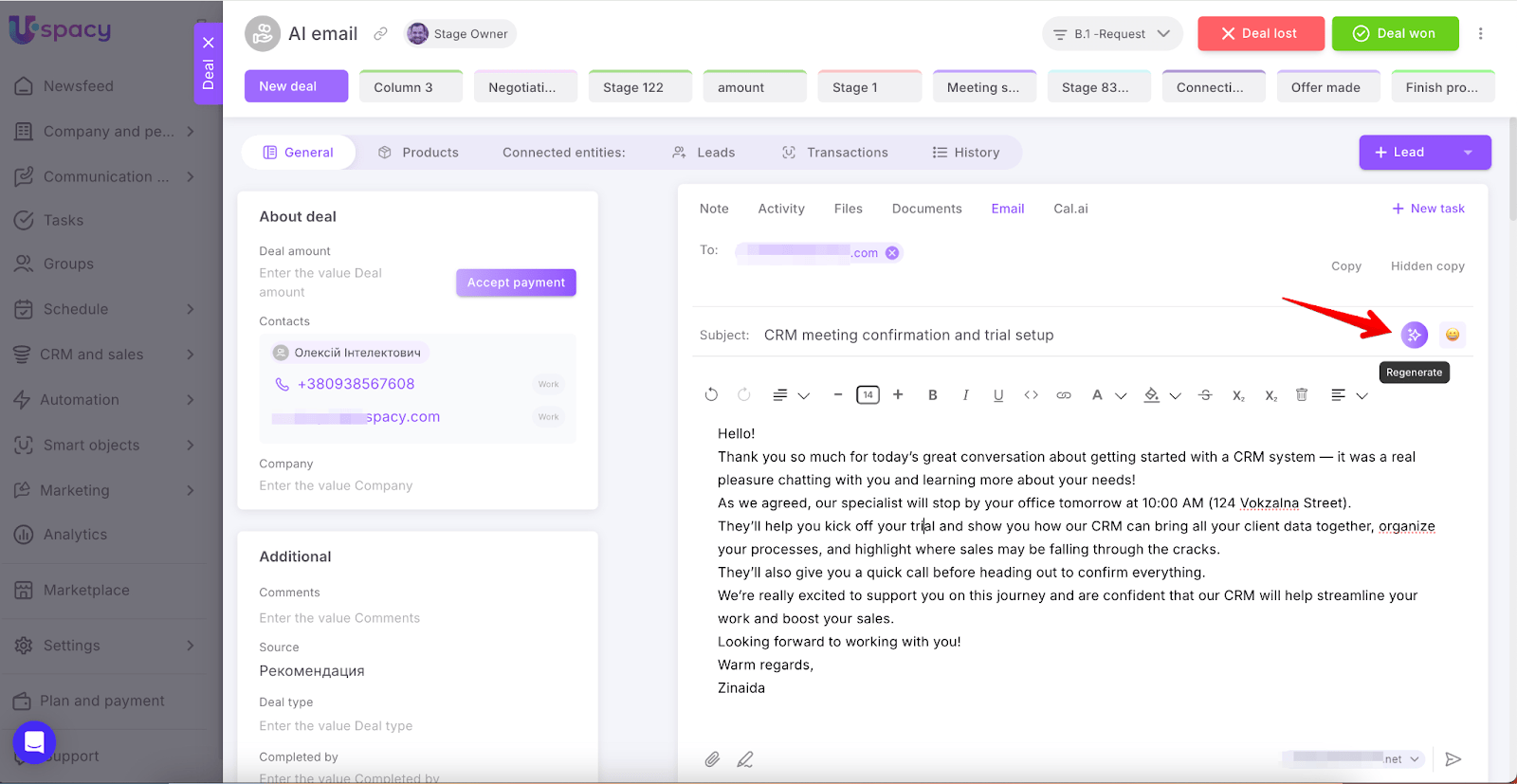
Within a client record, the manager opens the call recording and selects the “Summary email” option from the AI tools. The system analyzes the recording and transcription, extracts key points, and automatically generates the email text, including the subject line. The recipient’s address is pulled directly from the contact or company record — no manual copying required.
Next, the manager can set the tone: neutral, friendly, formal, casual, excited, grateful, or even sad. AI adapts the content to the selected tone, making the email sound natural while remaining professional. If the first version isn’t suitable, a single click generates a new draft in the chosen style.
Before sending, the manager can edit the text, add clarifications, change the subject, or attach files. The email is sent through the company mailbox connected to Uspacy. All correspondence is automatically logged in the CRM, rather than scattered across personal inboxes. In the end, the company gets three key benefits at once: an AI assistant for emails, a unified communication database, and a transparent process that works consistently for all managers.
Conclusion
Post-call summary emails turn chaotic agreements into a controlled, repeatable process. They capture expectations, accelerate decision-making, and help bring deals to a close without the dreaded “sorry, we misunderstood.” The team gets a complete picture for every client, and managers encounter fewer surprises in the sales funnel.
Uspacy adds a layer of automation and artificial intelligence to this process. The system reads the call content, generates a ready-to-send summary email in the appropriate tone, and sends it from the connected company mailbox — while keeping the entire context stored in a single CRM record. This saves time, reduces errors, and allows the team to focus on engaging the client instead of manually rewriting notes.
If your company doesn’t yet have a standard for post-call summaries, this is a great place to start: define the structure, test it on a few active deals, gather feedback, and make it a mandatory practice. Then, integrate Uspacy as a single platform with CRM, email, tasks, and AI tools so the assistant handles the routine work and helps close more deals without losing track of agreements.
Updated: February 2, 2026
More materials on the topic

Stagnation vs. System growth: Why a CRM will fail without an internal administrator
March 30, 2026

Garbage in, garbage out: 5 CRM data hygiene rules to protect your analytics
March 27, 2026

From notebooks to closed deals: How CRM turns a real estate agency into a sales machine
March 20, 2026
FAQ
Why take the time to write a summary email after a call if everything was already discussed verbally?
Won’t AI-generated summary emails feel like “generic templates without a personal touch”?
How can summary emails be integrated into the CRM in a way that actually impacts the sales funnel?
Uspacy is improving and developing at an incredible speed
Learn about product development plans
Uspacy roadmap 🚀