MCP Server: how to turn AI into a full-fledged CRM assistant
July 15, 2026
8-minute read

Dmytro Suslov

CRM becomes simpler when you can interact with it using natural language. MCP Server Uspacy connects AI to your business workflows, shortening the path from request to result.
Imagine never having to open multiple CRM sections just to find a client, check a deal, or create a task. Simply tell the AI what you need to do.
Most companies already use ChatGPT, Claude, and other AI services to draft content, generate ideas, or analyze information. However, these assistants often remain disconnected from actual business workflows. Employees manually transfer data between chats and the CRM, wasting valuable time and risking the loss of important context.
MCP Server Uspacy creates a secure, controlled connection between a compatible AI assistant and the Uspacy Workspace. Users can interact with ChatGPT, Claude, or any other MCP-compatible service using natural language. The assistant retrieves the necessary information and performs authorized actions within the system.
Next, we'll take a closer look at what the MCP acronym stands for and why this technology is transforming the way businesses interact with their core systems.
What is an MCP Server and why businesses should know about it
MCP is often described as a universal connector for artificial intelligence—similar to USB-C, but for digital services. It enables AI to securely interact with external systems, retrieve data, and use available tools.
In Uspacy, the technology acts as a translator between a user's request and a specific action performed within the Workspace.
In this process, several components work together:
- The user describes the desired outcome using natural language.
- ChatGPT, Claude, or another compatible AI assistant recognizes the user's intent.
- The MCP client maintains the connection between the AI service and the server.
- The MCP Server Uspacy provides the list of available tools.
- The Uspacy Workspace returns the requested information or saves authorized changes.
Employees don't need to understand APIs, write code, or memorize complex commands. They simply need to clearly specify the object, the action, and the desired outcome.
To see the difference in practice, let's look at how a simple request is transformed into a specific action within Uspacy.
How MCP Server Uspacy works in practice
The phrase, “Find the client's deal and assign a task to the account manager,” becomes more than just a request for AI—it turns into a complete workflow. The assistant analyzes the request, identifies the appropriate tools, and executes the authorized steps in sequence.
The process looks like this: user request → tool selection → request sent to Uspacy → data retrieved or action completed → response returned in the chat.
For example, a sales manager types into ChatGPT or Claude: “Find a contact by phone number and show the related deals.” The assistant sends the request to the MCP Server Uspacy, performs the search, and returns the results directly in the conversation.
Here's another example: “Create a task for the assigned account manager to call the client back tomorrow at 10:00 AM.” The AI identifies the appropriate employee, creates the task according to the specified parameters, and sends the command to Uspacy.
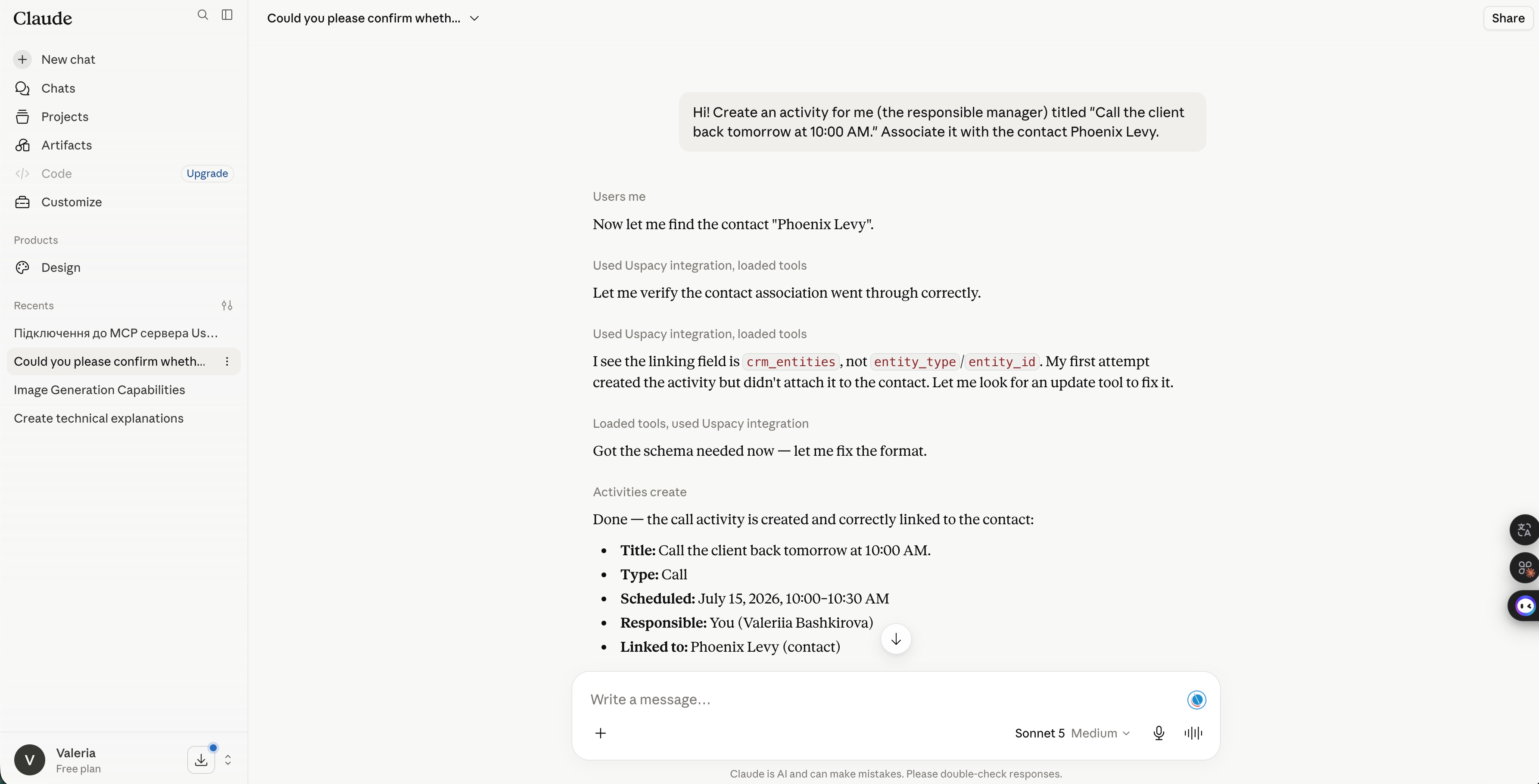
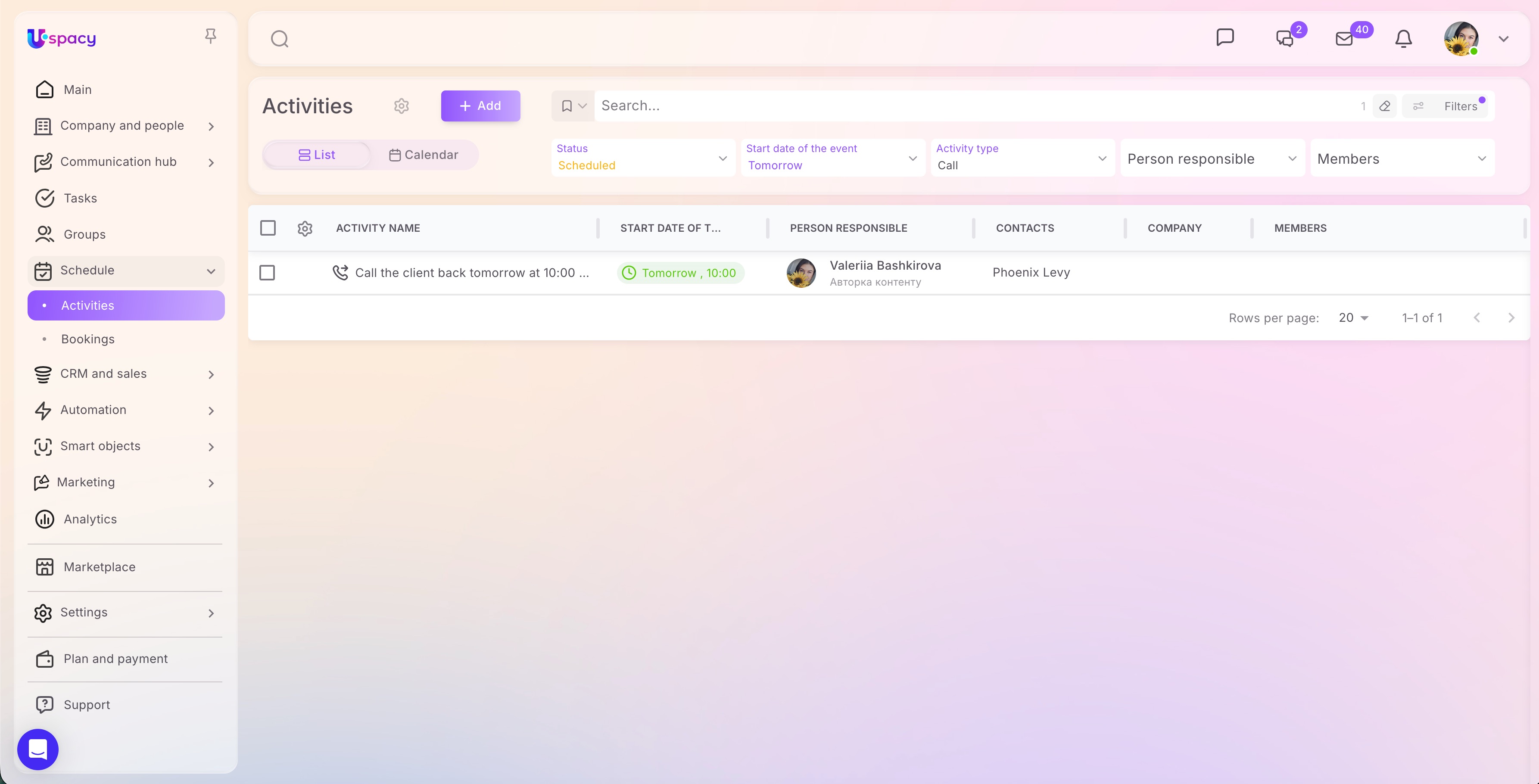
The assistant independently determines which available tool should be used. At the same time, it operates strictly within the capabilities of the MCP Server and the permissions assigned to the specific user.
This approach enables far more than simple information retrieval. Let's explore the business processes AI can already interact with today.
What MCP Server Uspacy can do
A single conversation with ChatGPT, Claude, or another compatible AI assistant brings together tasks that previously required switching between your CRM, tasks, calendar, and search. Users work through a familiar chat interface, while MCP Server Uspacy connects each request to the appropriate tool.
The platform supports the following core capabilities:
- CRM. The assistant can find, create, or update contacts, companies, leads, and deals. For example, a sales representative can ask it to update a deal status after a client call.
- Tasks. AI can view, create, edit, and complete tasks. A manager can ask to see the team's overdue tasks.
- Activities. The assistant schedules calls, meetings, and other activities. Simply specify the client, date, and responsible person.
- Comments. AI can review conversation history and add new information. After a call, a sales representative can record the outcome without opening the client's record.
- Users. The assistant can locate employees and assign ownership. This makes it easier to distribute new inquiries.
- Global search. AI finds information without requiring users to know the exact location of the data. Users simply describe what they remember about a client, deal, or task.
The true value of MCP Server goes beyond the number of actions it can perform. It lies in how quickly your team can move from a request to a completed result. Less time spent searching, entering data manually, and switching between applications means more time for clients, sales, and strategic decision-making.
How MCP Server benefits your business and team
A team's most valuable resource isn't the number of open tabs—it's the attention they can devote to clients. MCP Server shortens the path from request to result by eliminating unnecessary switching between applications and interfaces.
Your organization gains several practical benefits:
- less switching between your CRM and AI services;
- faster access to clients, deals, and tasks;
- reduced manual data entry;
- the ability to perform routine operations using natural language;
- a single conversation that preserves the full work context;
- a lower learning curve for new employees;
- gradual AI adoption without redesigning existing systems.
A sales representative can quickly review a client's interaction history before making a call. A manager can monitor the team's deals and tasks. A business owner can access the information they need without manually navigating different sections, while an administrator can test controlled AI-powered workflows.
At the same time, Uspacy remains the central hub for your business data. Instead of introducing yet another standalone system, your company adds a more intuitive way to interact with existing business processes.
To ensure greater speed doesn't lead to uncontrolled changes, it's essential to properly configure access permissions and set up the implementation from the start.
How to get started with MCP Server Uspacy securely
AI should help accelerate your work—but it should never have more authority than the person using it. MCP Server Uspacy operates strictly within the permissions of the authenticated user account.
For a secure implementation, follow these best practices:
- start with requests that only retrieve information;
- confirm the creation and modification of records separately;
- clearly specify the object, action, date, and responsible person;
- describe the expected outcome as precisely as possible;
- verify important changes directly in Uspacy;
- introduce more advanced workflows gradually.
A good first use case is something simple, such as: "Show me my tasks for today." After verifying the results, ask ChatGPT or Claude to create a single test task. The action should only be completed after a separate confirmation.
Once you've validated the basic workflows, MCP Server becomes a powerful day-to-day business tool. Your team gains the speed of AI while maintaining full control over business data and operations.
Conclusion
MCP Server Uspacy introduces a new way to interact with your CRM—through natural language. Users can do more than simply ask ChatGPT, Claude, or another compatible AI assistant questions. They can also use AI to find information and perform authorized actions within the system.
The real value of this technology goes beyond its novelty. It reduces routine work, preserves context, and helps teams move from request to result more quickly.
Updated: July 15, 2026
More materials on the topic

When artificial intelligence becomes a team member: how managers can manage the work of people and AI assistants
August 20, 2026

Modern CRM in 2026: 7 essential requirements for businesses
August 14, 2026

A voice assistant in CRM isn’t just a novelty: what sales challenges it helps solve
August 12, 2026
FAQ
What is MCP Server Uspacy in simple terms?
Which AI assistants work with MCP Server Uspacy?
Do I need to know programming to use MCP Server?
What actions can AI perform in Uspacy?
Is it safe to give AI access to CRM?
What scenario should I start with?
Uspacy is improving and developing at an incredible speed
Learn about product development plans
Uspacy roadmap 🚀